








This article will be interesting primarily for those testers who want to understand how to operate a popular “main” function in Python.
As we know, the Python programming language is very similar to a standard scripting language: for example, all lines inside a file (file.py) will be executed each time when this file is launched by a user.
Modules do not need the main function.
For example, we have the bugs.py module with the following software code:

The Bugs.py Module
Once it is properly launched, we will get the following result:
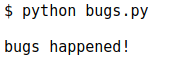
The Bugs.py Result
The print_bugs parameter was activated as a simple line of software code, not in a form of a function.
When a module became active, the corresponding line was executed completely.
But this may be a problem if bugs are imported by another module.
For example, we have the second module called more_bugs.py:
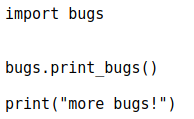
The More_bugs.py Module
It may seem that a user expects that two lines of code will be displayed.
But when the more_bugs.py file is launched, it will display three lines at a minimum:
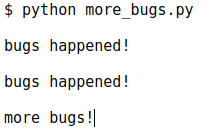
The More_bugs.py Result
You may ask: why is the “bugs happened” line duplicated? The answer is simple: when we called for the “import bugs” parameter, the bugs module had been already loaded, therefore, when the module is uploaded, its software code will be automatically executed.
The print_bugs parameter was called for in the fourth line of the bugs module. It will be later called for again, in the third line of the more_bugs module.
How can we prevent this bug from happening? It’s very easy: a user simply needs to test the _name _ variable of a module.
This variable will be automatically set as a module’s name.
If a module is a basic entry point, then the _name _ will be set as “_ main _”.
In other cases, if a module is imported, a variable will be set as a file’s name, not adding the py extension.
To better understand everything described above, we can rewrite all modules that are being tested.
For example, bugs:
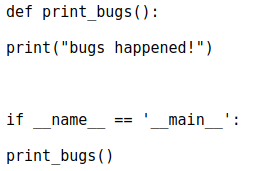
The Bugs Module
And then more_bugs:
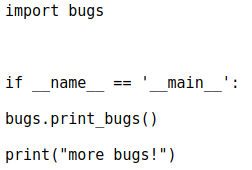
The More_bugs Module
If we launch the more_bugs file, the “bugs happened!” line will be displayed only one time:
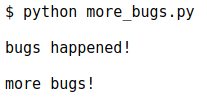
The Bugs Happened Line
A good practice to program modules in python: the lines that are called for should not be interconnected.
[highlight dark=”no”]They should contain only functions, classes, and the initialization of variables.[/highlight]
Everything executed as a part of “main” should be implemented only after being tested for the correspondence with the “if _ name _ == _ main _” condition.
In this case, when a module is imported by another one, there will be no other calls.
The_ name _ variable also makes the “main” body easier to be understood by a newcomer who studies Python programming language.




0 Comments