









Every dedicated tester has ever faced the problem of choosing the program for creating a CHM help file for application testing. CHM – is the file extension in Compressed HTML Help. Creating the help files by means of HTML Help Workshop that looks like a pile of different HTML pages and require compilation – is not a convenient way of working.
Professional testers that work in respectful software testing companies use Help&Manual documentation tool, developed by a technical writing company.
How to Use Help&Manual: Basic Steps
#1. Import CHM file into Help&Manual. Create a new project and chose the option “Import existing documentation from…” (Compiled HTML Help File). After the import, Help&Manual will show the directory tree pages that are easy for walking and include the separation of project files and configuration section.

#2. Editing the help file pages. Help&Manual offers a very powerful visual editor by means of which one can create or edit a page fast and without any difficulties.
#3. CHM Compilation. The project needs to be compiled after you finished working on it. Help&Manual offers an easy way. At first, choose the button “Publish” on the toolbar. Then input the way for CHM file, choose the skin mark off that you want to receive exactly CHM file and in few seconds it will be ready.
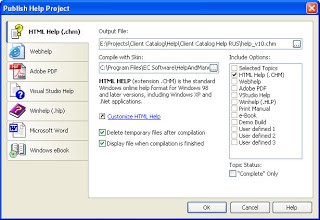
As you see, the way of creating, editing and compilation of CHM files is not that difficult while using Help&Manual tool. Look for efficient and easy ways for a successful and productive work performance.





0 Comments